
Unified Endpoint Management and Security: One console to rule them all.
UEM goes beyond simple device tracking. It integrates identity management, patch automation, remote troubleshooting, encryption enforcement, and threat monitoring into a single ecosystem. Instead of reacting to issues, organizations gain proactive control. In essence, UEM transforms scattered device administration into structured, policy-driven governance aligning productivity with security.






What is Unified Endpoint Management?
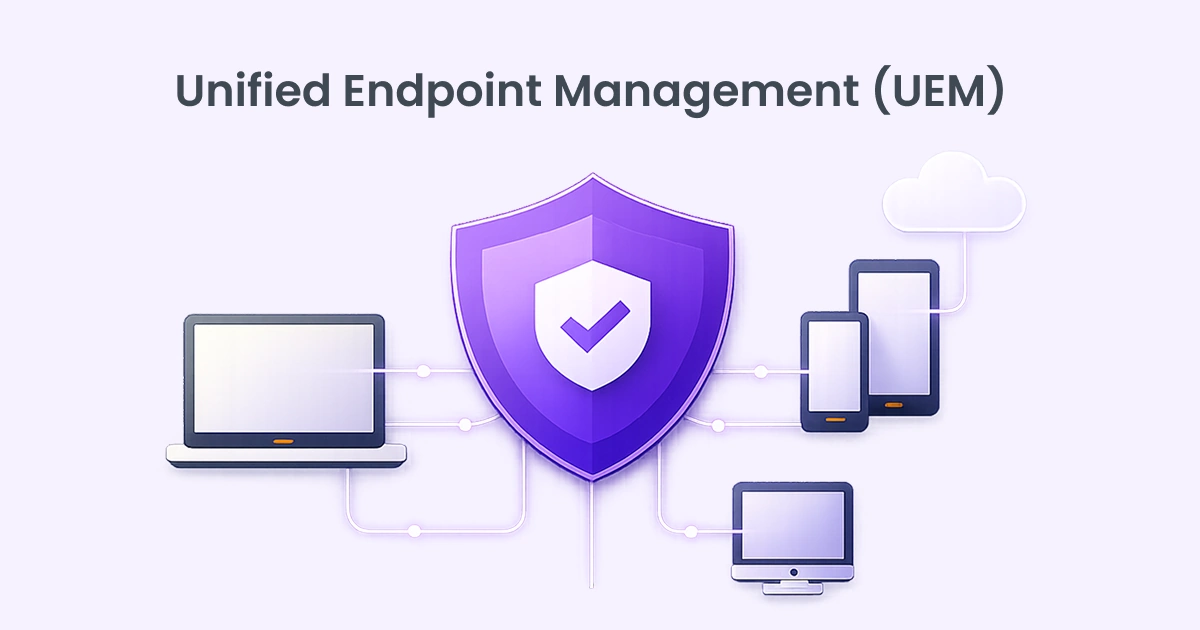
Unified Endpoint Management is a centralized approach to managing and securing all endpoints within an organization from a single console. Endpoints include laptops, desktops, smartphones, tablets, rugged devices, IoT endpoints, and even wearables. Instead of handling each category with separate tools, UEM consolidates device management, application control, security enforcement, and compliance monitoring under one unified framework.
At its core, UEM enables IT teams to provision devices, enforce policies, deploy applications, manage updates, and monitor security posture, regardless of operating system or location. Whether devices run Windows, macOS, iOS, Android, or Linux. UEM provides consistent visibility and governance. In a world where work happens everywhere, endpoints are no longer confined to office walls. Employees access corporate data from homes, airports, cafes, and personal devices. That flexibility demands tighter oversight.
Understanding the Differences Between MDM, EMM, and UEM
| MDM | EMM | UEM |
|---|---|---|
| Mobile Device Management focuses primarily on managing smartphones and tablets. Its capabilities include device enrollment, password enforcement, remote wipe, and basic configuration control | Enterprise Mobility Management expands on MDM by adding application management, mobile content management, and identity integration. It addresses broader mobile productivity needs but remains largely centered on mobile ecosystems. | Unified Endpoint Management goes further. It incorporates MDM and EMM capabilities while extending support to desktops, laptops, IoT devices, and rugged endpoints. It unifies management across operating systems and device categories. |
The key difference lies in scope and integration. MDM manages devices. EMM manages mobility. UEM manages the entire endpoint ecosystem. Organizations seeking consistent policy enforcement across all device types require UEM rather than standalone mobile solutions.
In a threat landscape defined by mobility and remote access, perimeter security alone is insufficient. UEM extends protection directly to endpoints where risk often begins.
Rise of Endpoint Attacks and the Growing Need for UEM
Endpoints have become the primary battlefield in modern cybersecurity. Once, networks were the perimeter. Today, every laptop, mobile device, and remote workstation is a doorway into enterprise systems. As hybrid work expands and cloud services dominate workflows, attackers increasingly target endpoints as the weakest link.
Phishing campaigns, ransomware, credential theft, zero-day exploits, and unpatched vulnerabilities often begin at the device level. A single compromised laptop can open access to sensitive data, internal systems, and cloud applications. The shift to BYOD (Bring Your Own Device) policies has further widened the attack surface. Personal devices often lack standardized security controls, making them prime targets.
Traditional management tools struggle in this environment. Fragmented visibility leads to blind spots. IT teams juggling multiple dashboards cannot respond with the speed modern threats demand. Meanwhile, regulatory pressure continues to grow, requiring proof of device compliance, encryption, and audit readiness.
This is where UEM becomes essential. It offers centralized monitoring, automated patching, policy enforcement, and real-time visibility across all endpoints. Instead of reacting after a breach, organizations can proactively detect anomalies, enforce compliance, and isolate compromised devices.
Endpoint attacks are not slowing down. They are becoming more sophisticated, automated, and relentless. Without unified control, defense becomes reactive and fragmented. UEM provides structured oversight, turning endpoint chaos into coordinated defense.
The Evolution from MDM to UEM

Mobile Device Management began as a solution to control smartphones and tablets entering the workplace. It allowed organizations to enforce passcodes, wipe lost devices, and manage corporate email access. But the device landscape quickly evolved. As laptops, desktops, and IoT devices joined the enterprise ecosystem, Enterprise Mobility Management expanded capabilities beyond basic mobile control.
It incorporated app management, identity integration, and content protection. Yet even EMM focused heavily on mobile environments.
The workforce, however, became device-agnostic. Employees switched seamlessly between phones, tablets, and computers. Managing them separately created inefficiencies and inconsistent policies. Organizations needed one system to govern all devices equally.


Unified Endpoint Management emerged as the natural progression. It absorbed MDM and EMM capabilities while expanding to cover traditional endpoints like Windows and macOS systems. Instead of separate silos, UEM offered centralized orchestration.
The shift from MDM to UEM reflects a larger truth. Security and productivity cannot exist in isolation. Device diversity demanded unified control. What began as mobile oversight matured into enterprise-wide endpoint governance.
Organizational Benefits of Unified Endpoint Management (UEM)
UEM delivers measurable operational and strategic benefits. First, it simplifies administration. Instead of maintaining separate systems for mobile devices, desktops, and laptops, IT teams manage everything from a single interface. This reduces training requirements and administrative overhead.
Second, UEM improves visibility. Organizations gain a comprehensive inventory of all endpoints, including ownership, location, compliance status, and installed software. That clarity reduces shadow IT and unmanaged risks.
Third, automation enhances efficiency. Automated provisioning, patching, and compliance enforcement reduce repetitive tasks. IT teams can redirect time toward innovation rather than routine troubleshooting.
Fourth, UEM supports remote and hybrid work models. Devices can be configured, updated, and secured regardless of physical location. Onboarding remote employees becomes seamless and scalable.
Fifth, compliance management becomes easier. Detailed audit logs and reporting capabilities assist organizations in meeting regulatory requirements such as data protection and industry standards.
Finally, cost control improves. Consolidating tools lowers licensing complexity and infrastructure overhead. Better visibility into software usage can reduce unnecessary license expenses.
UEM is not just about device control. It is about operational discipline, security consistency, and scalable governance in a device-diverse world.
How Does UEM Enhance Enterprise Security?
Security is the backbone of UEM. By centralizing policy enforcement, organizations eliminate inconsistent configurations that often create vulnerabilities. Encryption mandates, password standards, firewall controls, and patch requirements are applied uniformly across all endpoints.
Automated patch management closes security gaps quickly. Many breaches exploit known vulnerabilities that remain unpatched. UEM reduces that window of exposure by ensuring updates are deployed consistently.
Real-time monitoring strengthens defense. Administrators receive alerts when devices fall out of compliance or display unusual behavior. Compromised endpoints can be quarantined to prevent lateral movement within the network.
Data protection also improves. UEM can enforce containerization for corporate data, preventing sensitive information from mixing with personal apps on BYOD devices. Remote wipe capabilities protect data if devices are lost or stolen.
Integration with identity management ensures conditional access. Only compliant devices can access corporate systems, adding an additional security checkpoint beyond passwords.
Why Choose FGrade?
01
Certification and
Expertise
Over 70+ certification and Dedicated certified professionals for every product
02
Configurations & Data Migrations
Handled more than 10000+ configurations & Data Migrations
03
Customer
Support
Addressed 15000+ support tickets with 99% satisfaction rate resolution on both virtual & physical
Discover how UEM can streamline your business
Reach out to the FGRADE Concierge Team for a free consultation!
Call Us
+91 916 056 5554
Mail Us
sales@fgrade.com
How Does Unified Endpoint Management (UEM) Work?
Unified Endpoint Management works by centralizing endpoint oversight into a single administrative console. The system deploys lightweight agents or leverages native OS management frameworks on enrolled devices. Once enrolled, each endpoint communicates securely with the UEM server, reporting device health, compliance status, installed applications, and security posture.
Administrators define policies within the UEM platform. These policies may include password complexity requirements, encryption enforcement, firewall settings, patch schedules, Wi-Fi configurations, VPN access, and application restrictions. When devices check in, policies are automatically applied. Non-compliant devices can be flagged, restricted, or isolated.
UEM also streamlines device lifecycle management. From provisioning to retirement, IT can configure new devices remotely, push applications, manage updates, and wipe data if necessary. Automated patch management ensures operating systems and applications remain up to date, reducing vulnerabilities.
Integration with identity and access systems strengthens control. Access to corporate resources can be tied to device compliance status. If a device falls out of compliance missing patches or disabled encryption access can be automatically restricted.
Advanced UEM platforms incorporate analytics and reporting tools. Dashboards provide real-time visibility into device inventory, security risks, software usage, and policy adherence. Alerts notify administrators of anomalies or suspicious behavior.
In short, UEM combines automation, policy enforcement, and visibility. It removes manual overhead while tightening control. Devices may be scattered across geographies, but management remains centralized and consistent.
Discover how Fgrade can streamline your business
Reach out to the FGRADE Concierge Team for a free consultation!
As a Zoho consulting partner, we specialize in tailoring business
automation solutions to meet the unique needs of small and medium enterprises.

Search, compare & buy top business software with FGRADE. Find the best deals on Microsoft 365, Zoho, Google Workspace & more. Shop smart & save big!
AWFIS, Ground Floor, DSL abacus it park, Survey Colony, Industrial Development Area, Uppal, Hyderabad, Telangana 500039
Office Address