
ManageEngine PAM360: Powerful 360-degree protection for the hybrid enterprise.
ManageEngine PAM360 is an enterprise-ready Privileged Access Management solution designed to help organizations secure, manage, and audit access to critical systems and sensitive credentials. In modern IT environments, privileged accounts those with elevated permissions, are both a powerful tool and a major risk if left unmanaged. PAM360 restores order and control by providing a centralized platform for controlling who can access what, when, and for how long.






What Is ManageEngine PAM360?
Unlike basic password vaults or scattered admin tools, PAM360 enforces least-privileged access, monitors privileged sessions in real time, and logs every action taken with sensitive credentials. Whether accessed by IT admins, DevOps engineers, or automated services, privileged credentials are stored securely and handed out only under strict policy control.
The platform also integrates with key identity systems like Active Directory, LDAP, and cloud directories, making it suitable for hybrid environments where infrastructure spans on-prem, cloud, and SaaS. With PAM360, enterprises gain visibility, auditability, and security around accounts that matter most root accounts, service accounts, domain admins, and cloud administrators.
In essence, ManageEngine PAM360 helps organizations close a common attack surface, enforce governance, and reduce breach risk tied to privileged identities.

ManageEngine PAM360 Pricing
ManageEngine PAM360 pricing is typically based on the number of privileged accounts or managed systems being protected. Licensing options often include:
- Subscription-based model – Annual payments with included updates and support
- Perpetual licensing – One-time purchase plus optional maintenance
Pricing tiers may vary depending on scale, optional modules, and deployment models (on-premises vs cloud). Organizations generally request a customized quote to match infrastructure and protection requirements.
FEATURES OF MANAGEENGINE PAM360
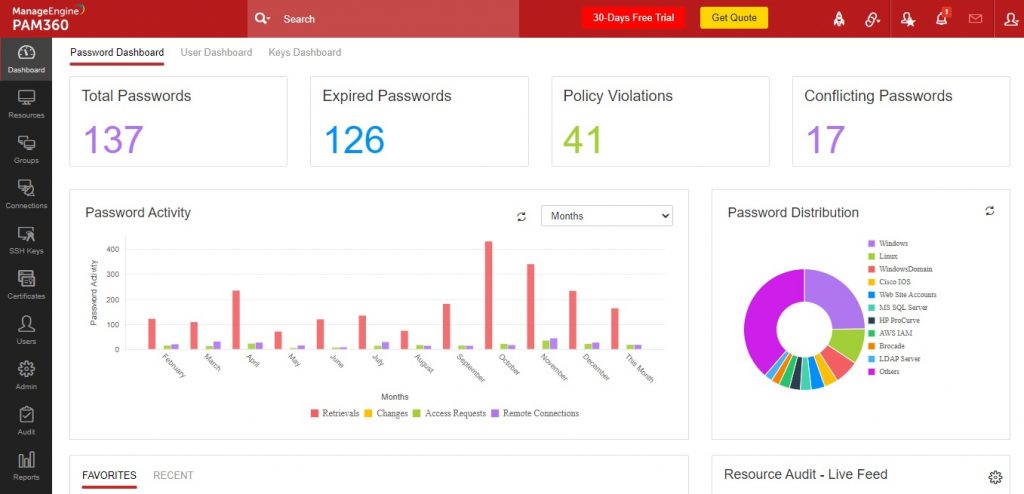
ManageEngine PAM360 combines foundational PAM capabilities with modern automation, monitoring, and risk-aware governance. Its feature set addresses both operational efficiency and security discipline.
Centralized Password Vaulting
PAM360 securely stores privileged credentials in an encrypted vault. Passwords, SSH keys, API keys, and secure notes are held under layered encryption, ensuring no unauthorized access.
Least-Privilege Access Control
Instead of broad access rights, PAM360 enforces just the access required at the moment, reducing unnecessary exposure. Delegated admin privileges help teams operate without over-permissioned accounts.
Session Management and Monitoring
Privileged sessions to servers, databases, and network devices can be launched from the PAM console. All activity is recorded and audited providing visibility and forensic insight.
Automated Credential Rotation
Manual password changes are error-prone and inconsistent. PAM360 rotates credentials automatically based on policy, ensuring compliance and reducing attack windows.
Approval Workflows
Before access is granted, the platform can require multi-step approvals. This adds governance, especially for sensitive systems.
Audit Trails and Reporting
Every privileged action is logged with user ID, timestamp, command executed, and session data. Administrators can export reports for compliance reviews and security audits.
Integration with Identity Sources
PAM360 integrates with Active Directory, LDAP, and identity providers to enforce consistent access policies across environments.
ALTERNATIVES OF MANAGE ENGINE PAM360
When evaluating PAM360, organizations often consider other Privileged Access Management solutions. Notable alternatives include:
- CyberArk Privileged Access Security – Enterprise-grade PAM with deep ecosystem support
- BeyondTrust Password Safe – Broad PAM and endpoint least-privilege controls
- Thycotic Secret Server – PAM focused on automated secrets management
- One Identity Safeguard – PAM and session management with secure gateways
- HashiCorp Vault – Secrets and credential management for DevOps environments
Why Choose FGrade?
01
Migrations
FGrade handles seamless migrations to ensuring your data is transferred accurately and securely. Our successful track record speaks for itself.
02
Certified Experts
Our team comprises certified professionals with extensive training in all IT products. Trust us to manage your HR systems with the utmost expertise.
03
Great Price Discounts
At FGrade, we're ready to help you implement SAMLconfidently, customizing workflows, setting up approvals all these at lower prices.
Discover how Manage Engine can streamline your business
Reach out to the FGRADE Concierge Team for a free consultation!
Call Us
+91 916 056 5554
Mail Us
sales@fgrade.com
Identity Access Management Products
ManageEngine ADAudit Plus
AD Manager Plus
AD SelfService Plus
Exchange Reporter Plus
RecoveryManager Plus
ManageEngine AD360
Identity 360
M365 Manager Plus
Password Manager Pro
ManageEngine PAM360
Key Manager Plus
Access Manager Plus
Frequently Asked Questions
What is PAM360 used for?
PAM360 is used to secure, control, and audit access to privileged accounts and sensitive systems. It protects credentials, manages sessions, enforces least privilege, and generates audit trails for compliance.
How much does a PAM solution cost?
Costs vary based on the number of privileged accounts, deployment model, and licensing type (subscription vs perpetual). Organizations typically request quotes to get accurate pricing based on their infrastructure.
How is PAM360 licensed?
PAM360 is licensed according to the scale of privileged accounts or managed systems. It may be offered as subscription or perpetual licensing, with options for enterprise support.
How many modules are available in PAM360?
PAM360 includes core modules such as password vaulting, session management, automatic credential rotation, audit logging, approval workflows, and identity integration. Additional modules may be available based on deployment and security needs.
How to use PAM360?
Admins start by onboarding privileged accounts into the vault, setting access policies, and defining workflows for access requests. From there, users request access through the PAM interface, which enforces policies, logs sessions, and rotates credentials as configured.
Discover how Fgrade can streamline your business
Reach out to the FGRADE Concierge Team for a free consultation!
As a Zoho consulting partner, we specialize in tailoring business
automation solutions to meet the unique needs of small and medium enterprises.

Search, compare & buy top business software with FGRADE. Find the best deals on Microsoft 365, Zoho, Google Workspace & more. Shop smart & save big!
AWFIS, Ground Floor, DSL abacus it park, Survey Colony, Industrial Development Area, Uppal, Hyderabad, Telangana 500039
Office Address